Getting Started with tdepend
Welcome to tdepend, a powerful CLI tool and library for analyzing architectural fitness in TypeScript projects. This guide will help you get started quickly.
Installation
Install tdepend globally for CLI usage:
npm install -g tdepend
# or
yarn global add tdepend
# or
pnpm add -g tdepend
Or install as a development dependency in your project:
npm install -D tdepend
# or
yarn add -D tdepend
# or
pnpm add -D tdepend
Quick Start (CLI)
Run tdepend on your project:
tdepend analyze
This performs a complete analysis and outputs architectural metrics including:
- Afferent Coupling (Ca): Number of modules that depend on this module
- Efferent Coupling (Ce): Number of modules this module depends on
- Instability (I): Ratio of efferent to total coupling
- Abstractness (A): Ratio of abstract types to total types
- Distance (D): Distance from the main sequence
- Cycles: Circular dependencies detected using Tarjan’s algorithm
CLI Commands & Options
# Basic analysis
tdepend analyze

# Use custom config file
tdepend analyze --config custom-config.json

# Export analysis to JSON file
tdepend analyze --export analysis-result.json
tdepend analyze -o analysis-result.json

# CI mode with JSON output and strict exit codes
tdepend analyze --ci

# Analyze specific class
tdepend analyze --class MyClassName

# Analyze specific namespace
tdepend analyze --namespace MyNamespace

# Analyze specific module/file
tdepend analyze src/services/user.ts
Quick Start (Library)
Use tdepend programmatically in your Node.js/TypeScript applications:
import { analyze, exportToFile } from 'tdepend';

// Run analysis with options
const result = await analyze({
  rootDir: 'src',
  include: ['src/**/*.ts'],
  failOnCycle: true
});

console.log(`Analyzed ${result.modules.length} modules`);
console.log(`Found ${result.cycles.length} cycles`);

// Export results to JSON
await exportToFile(result, 'architecture-snapshot.json');

// Access detailed metrics
for (const metric of result.metrics) {
  if (metric.distance > 0.8) {
    console.log(`${metric.filePath}: D=${metric.distance.toFixed(2)}`);
  }
}
Library API
Main Functions:
analyze(options?)- Run dependency analysis with custom optionsanalyzeWithConfig(config)- Execute analysis using a full config objectexportToFile(result, filePath, options?)- Write analysis results to JSON fileexportToJson(result, options?)- Serialize analysis to JSON stringtoSerializable(result)- Transform result to serializable format
Core Building Blocks:
DependencyGraph- Graph data structure for dependency relationshipsdetectCycles(graph)- Detect circular dependenciescomputeAllMetrics(graph, modules, cycles)- Calculate architectural metricsparseProject(files)- Parse and extract TypeScript module informationscanFiles(config)- Discover files matching glob patternsloadConfig(path?)- Load and validate configuration
Configuration
Create a tdepend.config.json file in your project root:
{
  "rootDir": "src",
  "include": ["src/**/*.ts", "src/**/*.tsx"],
  "exclude": ["**/*.test.ts", "**/*.spec.ts", "dist"],
  "metrics": {
    "enabled": ["coupling", "abstractness", "distance", "cycles"],
    "thresholds": {
      "distance": 0.6
    }
  },
  "analysis": {
    "target": null,
    "value": null
  },
  "ci": {
    "failOnThreshold": true,
    "failOnCycle": false,
    "outputFormat": "console"
  }
}
Configuration Options
- rootDir: Root directory for analysis (default:
"src") - include: Glob patterns for files to include (default:
["src/**/*.ts", "src/**/*.tsx"]) - exclude: Glob patterns for files to exclude (default:
["**/*.test.ts", "**/*.spec.ts", "dist"]) - metrics.enabled: Metrics to compute (
"coupling","abstractness","distance","cycles") - metrics.thresholds.distance: Maximum allowed distance from main sequence (default:
0.6) - analysis.target: Scope analysis to
"module","class", or"namespace"(default:null) - analysis.value: Value for the target scope
- ci.failOnThreshold: Exit with code 1 on threshold violations (default:
true) - ci.failOnCycle: Exit with code 1 when cycles are detected (default:
false) - ci.outputFormat: Output format -
"console"or"json"(default:"console")
Understanding Metrics
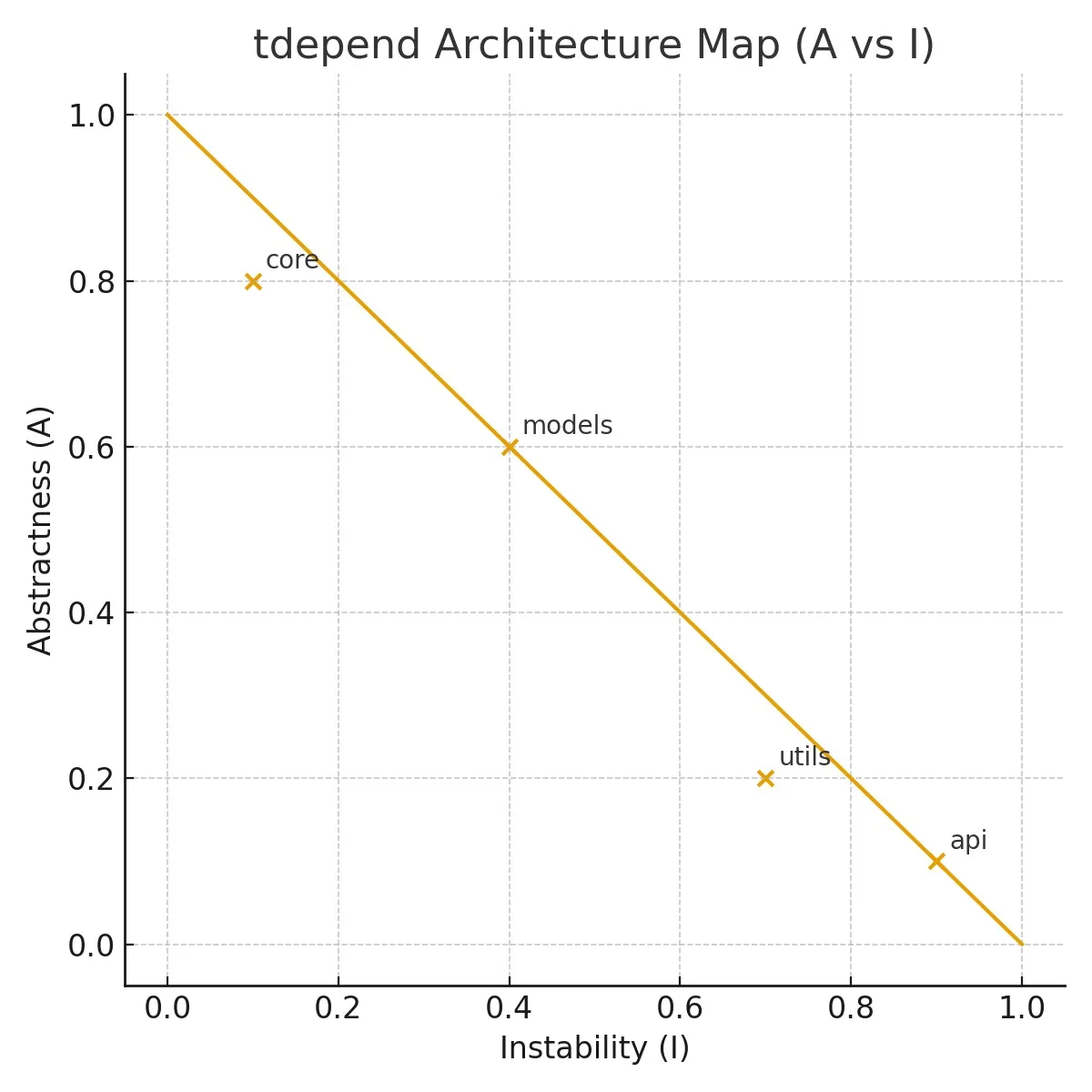
Instability (I)
Instability measures how susceptible a module is to change:
I = Ce / (Ca + Ce)
- I = 0: Maximally stable (many dependents, few dependencies)
- I = 1: Maximally unstable (few dependents, many dependencies)
Abstractness (A)
Abstractness measures the ratio of abstract types to concrete types:
A = (Abstract Classes + Interfaces) / Total Types
- A = 0: Completely concrete
- A = 1: Completely abstract
Distance from Main Sequence (D)
The main sequence represents the ideal balance between stability and abstractness:
D = |A + I - 1|
- D = 0: Perfect balance (on the main sequence)
- D > 0.6: Too far from ideal (potential design smell)
Modules in the Zone of Pain (high stability, low abstractness) or Zone of Uselessness (low stability, high abstractness) should be refactored.
Detecting Cycles
tdepend automatically detects circular dependencies using Tarjan’s strongly connected components algorithm:
tdepend analyze
Cycles are included in the analysis output. To fail the build when cycles are detected:
tdepend analyze --ci
With failOnCycle: true in your config, or:
const result = await analyze({
  rootDir: 'src',
  failOnCycle: true
});
Export Formats
CLI Export
# Export full analysis with all data
tdepend analyze --export full-analysis.json
Programmatic Export
import { analyze, exportToFile, toSerializable } from 'tdepend';

const result = await analyze({ rootDir: 'src' });

// Export to file
await exportToFile(result, 'analysis.json');

// Or get JSON string
const json = exportToJson(result, { pretty: true });

// Or get serializable object for custom processing
const serialized = toSerializable(result);
The exported JSON includes:
- Format version and timestamp
- Full configuration used
- All parsed modules with imports/exports
- Serialized dependency graph (Sets → Arrays)
- Normalized cycles with unique IDs
- Complete metrics for all modules
- Analysis report with violations
Integration with Other Tools
tdepend is designed to work alongside other architectural tools:
With ts-arch
import { analyze } from 'tdepend';

const result = await analyze({ rootDir: 'src' });

// Use dependency graph for ts-arch rules
const dependencies = result.modules.map(m => ({
  file: m.filePath,
  imports: m.imports,
}));

// Apply architectural rules...
With CI/CD
import { analyze, exportToFile } from 'tdepend';

const result = await analyze({
  rootDir: 'src',
  failOnCycle: true,
  failOnThreshold: true
});

await exportToFile(result, 'tdepend-report.json');

if (!result.report.success) {
  console.error('Architecture violations detected!');
  process.exit(1);
}
With Custom Dashboards
import { analyze } from 'tdepend';

const result = await analyze({ rootDir: 'src' });

const dashboard = {
  timestamp: new Date().toISOString(),
  summary: result.report.summary,
  avgDistance: result.metrics.reduce((sum, m) => sum + m.distance, 0) / result.metrics.length,
  topCoupled: result.metrics.sort((a, b) => (b.Ce + b.Ca) - (a.Ce + a.Ca)).slice(0, 10)
};

// Send to your monitoring system...
Example Output
Console Output
📊 Summary:
  Total imports: 51
  Total exports: 70
  Total classes: 1
  Total interfaces: 15
  Cycles detected: 0

📥 Top modules by Ca (Afferent Coupling):
  - schema.ts: Ca=7, Ce=0
  - dependencyGraph.ts: Ca=6, Ce=2
  - parser.ts: Ca=6, Ce=0

📏 Modules by Distance from Main Sequence:
  - index.ts: D=1.00, A=0.00, I=0.00 (Zone of Pain)
  - schema.ts: D=1.00, A=0.00, I=0.00 (Zone of Pain)
JSON Output
{
  "version": "1.0.0",
  "timestamp": "2026-02-08T15:17:26.494Z",
  "config": { ... },
  "modules": [ ... ],
  "graph": {
    "nodes": [
      {
        "filePath": "/path/to/file.ts",
        "dependencies": ["..."],
        "dependents": ["..."]
      }
    ]
  },
  "cycles": [],
  "metrics": [ ... ],
  "report": {
    "success": true,
    "summary": { ... },
    "violations": { ... }
  }
}